Best Smart Lighting Systems of 2024: Illuminate Your Home with Intelligence


Welcome to the future of home illumination, where we dive into the best smart lighting systems, where lights don’t just brighten rooms—they anticipate your needs, set the mood, and even help you save on energy bills.
Did you know that smart lighting can reduce your energy consumption by up to 90% compared to traditional incandescent bulbs? That’s right, folks! We’re not just talking about convenience; we’re talking about a revolution in how we light up our lives.
As we move through 2024, smart lighting systems have become more than just a cool gadget—they’re an essential part of the modern smart home. Whether you’re a tech enthusiast or just someone who’s tired of fumbling for light switches in the dark, buckle up! We’re about to embark on a journey through the brightest (and smartest) lighting solutions of the year.
Trust me, by the end of this guide, you’ll be seeing your home in a whole new light—literally!
Understanding Smart Lighting: More Than Just On and Off
Let me tell you, when I first heard about smart lighting, I thought it was just a fancy way to turn lights on and off with your phone. Boy, was I in for a surprise! It’s been quite the journey figuring out all the cool stuff these high-tech bulbs can do.
It took me a while to realize I was barely scratching the surface. These little light wizards can do so much more than just brighten up a room. For starters, did you know you can change the colour of most smart bulbs? I didn’t, until I accidentally set my living room to a deep purple one evening.
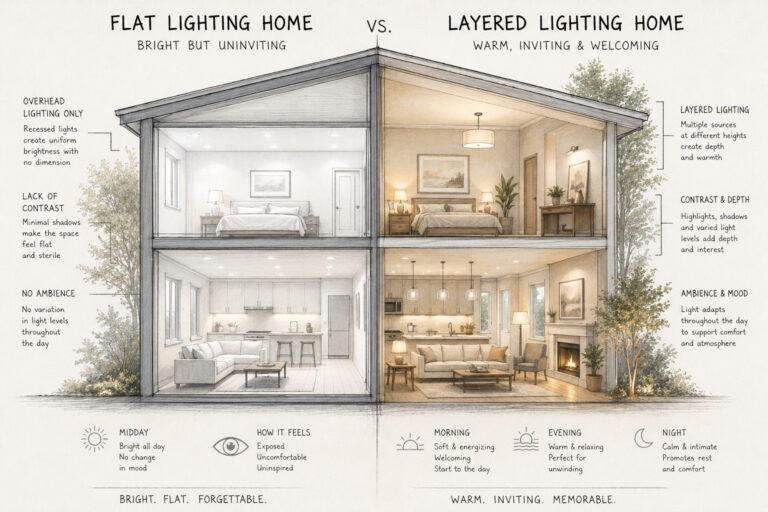
But here’s where it gets really interesting. Smart lighting isn’t just about pretty colours – it can actually help improve your daily life. I started experimenting with different colour temperatures and found out that cooler, bluer light in the morning helps me wake up faster. And in the evening, warmer tones make it easier to wind down. It’s like having a personal sun that adapts to your schedule!
One of my favourite features is scheduling. I used to always forget to turn off the porch light, but now it comes on at sunset and turns off at sunrise automatically.
It’s like having a tiny, energy-efficient butler. And speaking of energy efficiency, these smart bulbs have helped me cut down on my electricity bill. They use way less power than traditional bulbs, and I can easily see which ones I’ve left on by mistake.
The real game-changer for me was when I started integrating my smart lights with other smart home devices. Now, when my security camera detects motion outside, the porch light flashes red. It’s probably overkill, but it can make you feel like you are living in a sci-fi movie.
If you’re thinking about diving into the world of smart lighting, here’s my advice: start small. Get one or two bulbs and play around with them. See what works for you. And don’t be afraid to get creative! I’ve set up a lighting scene that mimics a sunset for our family movie nights. It’s not quite the same as being on a beach, but hey, it’s pretty darn close.
Just remember, smart lighting is more than just convenient – it’s about creating the right atmosphere for every moment of your day. Whether you’re working, relaxing, or entertaining, there’s a perfect lighting setup waiting to be discovered. And trust me, once you start, you’ll wonder how you ever lived with plain old on/off switches.
So go ahead, give smart lighting a try. Who knows? You might just find yourself in a whole new light. (Sorry, I couldn’t resist that pun. My kids would’ve groaned at that one!)
Best Smart Lighting Brands of 2024: A Review
Alright, let’s dive into the world of the best smart lighting brands in 2024. Man, it feels like just yesterday I was fumbling with my first smart bulb, and now look at all these options! It’s enough to make your head spin.
Let me tell you, not all brands are created equal. I learned that the hard way when I skimped out on some no-name bulbs from an online marketplace. They worked great… for about a week. Then they started flashing like a disco inferno every time I tried to turn them off. My teenage daughter thought it was hilarious, but my migraine disagreed.
Phillips Hue
So, let’s talk about the cream of the crop. Philips Hue is still going strong in 2024. These guys have been in the game since the beginning, and it shows. Their ecosystem is rock-solid, and the colour accuracy is spot-on. I’ve got their light strip behind my TV, and it makes movie nights feel like we’re at the cinema. Just don’t get carried away with the popcorn like I did – cleaning butter off the couch is no fun.
Phillips use the hub system that you have connected to your router. this enables a much larger amount of lights including different styles that you can group together with out the issues of clogging your router.
NANOLEAF
But Philips isn’t the only player worth mentioning. Nanoleaf has really upped their game this year. Their new line of geometric panels is like having interactive art on your walls. I installed some in my home office, and now my Zoom background is the envy of every meeting. Though I did have a moment of panic when I couldn’t figure out how to turn them off during an important call. Pro tip: always read the manual first!
WYZE
For those on a budget, Wyze is still killing it. Their bulbs might not have all the bells and whistles, but they’re reliable and easy on the wallet. I put some in my kids’ rooms, and they’ve survived countless “accidental” basketball throws. Can’t say the same for my nerves, though.
LUMISMART
Now, let’s talk about a newcomer that’s been turning heads – LumiSmart. These folks have found a sweet spot between affordability and features. Their app is intuitive enough that even my technophobe neighbour figured it out. And trust me, if he can do it, anyone can.
LIFX
But here’s the thing about smart lighting – it’s not just about the bulbs. It’s about how well they play with others. I learned this when I tried to get my LIFX bulbs to sync with my smart doorbell. Let’s just say it was less “welcome home” and more “seizure warning.”
SENGLED
That’s why I’m loving what Sengled is doing. Their bulbs are compatible with practically everything. Alexa, Google Home, Apple HomeKit – you name it, they work with it. It’s like they’re the Switzerland of smart lighting.
But no review would be complete without mentioning the elephant in the room – connection issues. Even the best brands can fall victim to the dreaded “offline” status. I once spent an entire evening trying to reconnect my C by GE bulbs, only to realize I’d forgotten to pay my internet bill. Not my proudest moment.
So, what’s the bottom line? In 2024, we’re spoiled for choice when it comes to smart lighting. Whether you’re after fancy effects, energy savings, or just want to impress your friends, there’s a brand out there for you. Just remember to start small, read those manuals, and for Pete’s sake, don’t forget to pay your internet bill!
Setting Up Your Best Smart Lighting System: A Step-by-Step Guide
Setting up your smart lighting system. I got to tell you, when I first decided to make my home “smarter,” I felt like I was about to launch a space shuttle. But don’t worry – if I can figure it out, you definitely can!
First things first, you need to choose your ecosystem. It’s like picking a team in sports, except instead of jerseys, you’re committing to a specific app and hub. I went with Phillips Hue because, well, that’s what the guy at the store recommended. Turns out, he knew his stuff!
Once you’ve got your gear, it’s time to install the hub. This little box is like the brain of your operation. Find a spot near your router and plug it in. Easy, right? Well, it was for me until I realized I’d run out of outlets. Pro tip: invest in a good surge protector. Worth the money.
Now comes the fun part – screwing in those fancy new bulbs and downlights. I was so excited, I practically sprinted up the ladder to replace every bulb and downlight in the house. Big mistake. By the time I got to the last one, I was sweating like a pig and my arms felt like noodles. Take it slow, people. Rome wasn’t lit in a day.
With the bulbs and downlights in place, it’s time to fire up that app. This is where things can get a bit tricky. The app will usually walk you through the process, but sometimes it feels like it’s speaking another language. I remember staring at my phone for a good 10 minutes, wondering what the heck “discovery mode” meant. Turns out, I just needed to turn the lights on and off a few times. Who knew? Again read the instructions of whichever brand you get.
Once your app finds the bulbs, you’ll need to name them. This is crucial! Don’t be like me and name them all “Living Room Light 1,” “Living Room Light 2,” etc. I thought I was being organized, but trying to remember which number corresponded to which light was a nightmare. Get creative! I now have lights named “Couch Potato Corner” and “Where I Pretend to Read.”
Now, here’s where the magic happens – creating routines and scenes. This is how you tell your lights to do cool stuff automatically. I set up a “Movie Night” scene that dims the lights and turns them a cool blue colour. My kids think I’m a wizard. Little do they know, I spent three hours figuring it out while they were at school.
One thing that caught me off guard was voice control setup. I thought I could just start barking orders at my lights like some kind of luminous dictator. Nope. You have to connect your smart lighting system to your voice assistant first. It took me an embarrassingly long time to realize why Alexa kept ignoring my commands to turn off the kitchen light.
Lastly, don’t forget to set up your away-from-home controls. Being able to turn your lights on and off when you’re not home is like having a superpower.
Just be careful not to abuse it. I may or may not have freaked out my cat by randomly turning lights on and off while on vacation. Poor Fluffy probably thought the house was haunted.
Setting up a smart lighting system can feel overwhelming at first, but once you get the hang of it, it’s actually pretty fun. And the payoff is worth it. There’s nothing quite like walking into a perfectly lit home, all set up just the way you like it. Just remember to keep a few “dumb” bulbs around for emergencies. You know, in case the Wi-Fi goes out and you find yourself stumbling around in the dark like a character in a bad horror movie.
So go forth and illuminate, my friends! And if all else fails, there’s always candlelight.
Voice Control and Smart Home Integration: Hands-Free Illumination
Let’s hear about voice control and smart home integration for your lighting setup. I have to tell ya, when I first started using voice commands to control my lights, I felt like I was living in the future. Well, until I accidentally turned on every light in the house at 3 AM trying to get a glass of water. My wife wasn’t exactly thrilled about that one.
Google Home
So, here’s the deal with voice control – it’s awesome, but it takes some getting used to. I remember the first time I tried to use it, I stood in my living room, cleared my throat like I was about to give a speech, and said, “Alexa, turn on the lights.” Nothing happened. I tried again, louder this time. Still nothing. Turns out, I hadn’t even plugged in the Echo dot. Smooth move, right?
Amazon Alexa
But once you get it set up correctly, it’s like having your own personal lighting genie. No more fumbling for switches when your hands are full of groceries or when you’re cozied up on the couch and don’t want to move. Just say the magic words, and voila! Let there be light!
Phillips Hue
Now, integrating your smart lights with your voice assistant isn’t always a walk in the park. Each system has its own quirks. I spent a whole afternoon trying to get my Google Home to play nice with my Philips Hue lights. It was like trying to get my kids to agree on what to watch on TV – lots of back and forth and a few moments of wanting to pull my hair out. Patience is the key but I am sure that is not what you want to hear lol.
But here’s a pro tip: grouping your lights can be a game-changer. Instead of saying, “Hey Google, turn on the kitchen overhead light, the counter light, and the pantry light,” you can just say, “Hey Google, turn on the kitchen lights.” It’s like having a universal remote for your home. Just be careful how you name your groups. I once named a group “party mode,” and let’s just say my teenager figured that one out pretty quick.
One thing that caught me off guard was how specific you sometimes need to be with your commands. I’d say, “Alexa, dim the lights,” and she’d respond with, “Which lights would you like me to dim?” It was like playing 20 questions just to lower the brightness a bit. Now I know to say, “Alexa, dim the living room lights to 50%.” Much smoother.
But it’s not just about turning lights on and off. You can get pretty fancy with voice commands. I’ve set up routines where I can say, “Hey Google, it’s movie time,” and it’ll dim the living room lights, turn on the bias lighting behind the TV, and even start up the popcorn maker. Okay, that last part isn’t true, but I can dream, right?
The real magic happens when you start integrating your lights with other smart home devices. I’ve got my front porch light set up to turn on when my video doorbell detects motion. It’s great for deterring porch pirates, though it did cause a bit of a light show when a curious raccoon decided to investigate our trash cans one night.
One word of caution – be careful with your phrasing when setting up voice commands. I once set up a command to “turn off all the lights” when I say “goodnight.” Sounds great, right? Well, it was, until I was reading a bedtime story to my kid and said “goodnight” as part of the story. Suddenly, we were sitting in pitch darkness. You live and learn!
And here’s something I wish someone had told me earlier – you can use voice controls to change the colour of your lights too. It’s all fun and games until you accidentally tell Alexa to make the bedroom “passionate red” when you meant to say “relaxing blue.” Try explaining that one to your significant other!
At the end of the day, voice control and smart home integration can make your life a whole lot easier. Just be prepared for a bit of a learning curve, and don’t be afraid to experiment. And hey, if all else fails, you can always go back to the good old-fashioned light switch. Just make sure you remember where it is in the dark!
Customization and Scheduling: Tailoring Light to Your Lifestyle
Customizing and scheduling your smart lights, huh? Let me tell ya, this is where the rubber really meets the road in the world of smart lighting. When I first dove into this, I thought I was gonna be some kinda lighting wizard. Turns out, I was more like a bumbling apprentice for a while there.
Let’s start with customization. Man, the options these days are endless! It’s like being a kid in a candy store, except instead of sugar, you’re high on lumens. I remember when I first realized I could change the colour of my living room lights. Fun!
But once you get past the initial excitement of turning your home into a disco, you start to see the real potential. I’ve set up a soft, warm glow in the bedroom that gradually brightens in the morning. It’s like waking up to your own personal sunrise. Way better than that jarring alarm clock that used to make me feel like I was waking up in a war zone.
Now, there is scheduling. This is where things can get really interesting – or really confusing if you’re like me and tend to overcomplicate things. I once tried to set up a schedule that would change the lights every hour based on my “ideal day.” By noon, I felt like I was living in a fun house and couldn’t remember if it was time to work or nap.
But when you get it right, oh boy, it’s a game-changer. I’ve got my porch light set to turn on at sunset and off at sunrise. No more coming home to a dark house or wasting electricity by forgetting to turn it off in the morning. It’s like having a really reliable butler who’s really into astronomy.
One of my favourite features is the vacation mode. You can set your lights to turn on and off randomly while you’re away, making it look like someone’s home. I used this when we went on a family trip last summer. Came back to find my neighbour had called the cops because he thought someone was having a rave in our living room every night. Oops. Lesson learned: maybe don’t set ALL your lights to strobe mode.
But here’s where I really geeked out – integrating light schedules with my daily routines. I’ve got this whole system now where my kitchen lights brighten when my coffee maker starts in the morning. It’s like my house is saying, “Rise and shine, buddy! Time to caffeinate!”
Oh, and don’t even get me started on scenes. These are like pre-sets for your lights, and they’re a total game-changer. I’ve got one called “Homework Time” that brightens up the dining room where the kids study. Another called “Netflix and Chill” that dims the living room lights to just the right level for binge-watching. Though I did have to rename that one after my teenage daughter gave me a very awkward explanation of what that phrase actually means.
And here’s a tip: use the fade option when scheduling lights to turn on or off. Trust me, a gradual change is much nicer than lights suddenly blasting on full power. I learned that after nearly giving myself a heart attack when the bathroom lights snapped on at full brightness during a middle-of-the-night trip.
The coolest part about all this customization and scheduling? It actually helps save energy. My electric bill has gone down since I’m not leaving lights on all the time anymore. It’s like my house has become energy-conscious all on its own.
But let’s be real for a second. Sometimes, all this tech can be a bit much. There are still days when I just want to flip a switch and be done with it. And that’s okay! The beauty of smart lighting is that it’s there when you want it, but you’re still in control.
So, if you’re thinking about diving into the world of customized, scheduled lighting, I say go for it! Just be prepared for a bit of trial and error. And maybe warn your neighbours before you start experimenting with strobe effects. Trust me on that one.
Energy Efficiency and Cost Savings: Smart Lighting’s Hidden Perks
Now, I’m no math whiz. Numbers make my head spin faster than my kid’s fidget spinner. But even I couldn’t miss the difference in my energy costs. It was like someone had waved a magic wand over my utility bills. At first, I thought the power company had made a mistake. I even called them up, all ready to play the “gotcha” card.
Let’s break it down a bit. These smart LED bulbs use way less juice than traditional incandescent. We’re talking like 75% less. That’s not just a little bit – that’s a “Holy cow, why didn’t I do this sooner?” kind of difference. It’s like going from driving a gas-guzzling monster truck to a sleek little hybrid, except you don’t have to give up any of the power.
But here’s the kicker – it’s not just about the bulbs themselves. It’s how you use them that really makes the difference. See, with traditional lights, it’s easy to forget to turn them off. I used to be the “light police” in my house, always nagging everyone to flip the switch when they left a room. Now? I don’t have to. These smart bulbs can turn themselves off when no one’s around. It’s like having a really energy-conscious ghost in your house.
And don’t even get me started on dimming. I always thought dimming was just for setting the mood, you know? Turns out, it’s a secret weapon for your wallet too. Dimming your lights by just 50% can cut their energy use by 40%. I’ve got mine set to automatically dim in the evenings, and let me tell you, my living room feels relaxing and my bank account feels healthier.
Now, I know what you’re thinking. “But smart bulbs are more expensive upfront!” And you’re right, they are. I almost choked on my coffee when I saw the price tag for my first set. But here’s the thing – these little light soldiers pay for themselves over time.
They last way longer than regular bulbs, some up to 15-20 years! By the time you need to replace them, your kids will be in college. (On second thought, maybe start saving for that instead.)
Oh, and let’s talk about those scheduling features. They’re not just convenient – they’re little energy-saving ninjas. I’ve got my outdoor lights set to turn on only when it’s dark and someone’s approaching the house. No more leaving them on all night “just in case.”
And my indoor lights? They know my routine better than I do. They start dimming an hour before bedtime, gently reminding me to start winding down. It’s like having a really passive-aggressive mom, but in a good way.
But here’s where I really geek out – the data. Most smart lighting systems come with apps that show you how much energy you’re using. It’s like having a Fitbit for your house. I became obsessed with checking it, always trying to beat my “high score” for energy savings. My wife thought I’d lost it, but hey, who’s laughing now when we can afford that fancy dinner out?
And don’t forget about those rebates and incentives. Some power companies will actually pay you to switch to smart lighting. It’s like getting a high-five and a twenty from your utility provider. Check with your local company – you might be sitting on a goldmine of savings.
Now, I’m not gonna lie – there’s a learning curve. You might spend a few days feeling like you’re trying to pilot a spaceship just to turn on your kitchen light. But stick with it. Once you get the hang of it, you’ll wonder how you ever lived with dumb old regular bulbs.
Advanced Features: Beyond Basic Illumination
We’re now about to take a wild ride into the world of advanced smart lighting features. When I first dipped my toes into this stuff, I thought changing colours was the peak of lighting technology. Boy, was I in for a surprise!
Let’s kick things off with colour-changing bulbs. Now, these aren’t just for impressing your friends at parties (though they’re great for that too).
I’ve found some pretty nifty uses for these chameleon-like lights. For instance, I’ve set up my front porch light to turn a soft blue when it’s supposed to rain. It’s like having my own personal weather station!
But the real game-changer for me has been adaptive lighting. This is some serious sci-fi stuff, folks. My lights now adjust their colour temperature throughout the day to match the natural light outside.
In the morning, they’re a bright, cool white that helps me shake off the zombie-like state I’m usually in before my coffee. As the day goes on, they gradually warm up, until evening when they’re a soft, warm glow that tells my body it’s time to wind down.
Fair warning though – it takes some getting used to. The first week, I kept thinking I was going colour blind as the lights slowly shifted throughout the day.
Now, let’s talk about motion sensors and presence detection. This is where things get really fancy. I’ve got sensors set up all over the house, so lights turn on automatically when someone enters a room.
It’s great… most of the time. There was that one incident where our cat set off the hallway sensor in the middle of the night, and I thought we were being burgled. Turns out, Mr. Whiskers just wanted a midnight snack.
But here’s where it gets really cool – some systems can actually learn your routines. My lights now know that I usually head to the kitchen for a snack around 10 PM, so they light up a path for me. It’s like having my own personal yellow brick road, except instead of the Emerald City, it leads to the cookie jar.
And don’t even get me started on music synchronization. This feature turns your living room into a mini disco faster than you can say “Stayin’ Alive.” I set this up for a family game night, thinking it would be a fun addition to our usual routine.
One of the coolest applications I’ve found is using these advanced features for home security.
I’ve set up a “vacation mode” that makes it look like we’re home even when we’re not. The lights turn on and off in different rooms, mimicking our usual patterns. It’s like having a ghost family living in your house while you’re away.
Though I did forget to turn it off once when we got back, leading to a very confusing moment when I walked into a room and the lights suddenly changed as if surprised to see me.
Oh, and for you movie buffs out there – you can set up your lights to enhance your home theatre experience. I’ve got mine programmed to dim when I start a movie, and they even change colour to match what’s happening on screen.
It’s pretty awesome, although it did make watching “Jaws” a bit more terrifying than I remembered.
The possibilities with these advanced features are endless. I’m constantly finding new ways to use them. Just last week, I set up a lighting routine to help my kids with their morning schedule.
The lights in their room slowly brighten to wake them up, then change colour when it’s time to get dressed, eat breakfast, and head out the door. It’s like having a personal assistant, except this one doesn’t judge me for eating cereal for dinner.
But I’ll be honest – sometimes all this tech can be a bit overwhelming. There are days when I just want to flip a switch and be done with it. And that’s okay! The beauty of these advanced features is that they’re there when you want them, but you’re still in control.
So, if you’re thinking about diving into the deep end of smart lighting, I say go for it! Just be prepared for a bit of a learning curve, and maybe warn your neighbours before you start your own personal light show.
And who knows? You might just find yourself becoming the lighting guru of your friend group. Just don’t let it go to your head – nobody likes a show-off, even if their house does look like it’s straight out of the future.
And there you have it, folks—a brilliantly illuminating journey through the world of smart lighting! From voice-controlled ambiance to energy-saving automation, we’ve explored how these intelligent systems are revolutionizing the way we light up our lives.
Remember, smart lighting isn’t just about convenience; it’s about creating a more comfortable, efficient, and secure home environment.
So why stick with the old flip-and-switch when you can have a lighting system that thinks for itself? Whether you’re ready to go all-in with a comprehensive ecosystem or start small with a few smart bulbs, there’s never been a better time to brighten up your home—and your life—with smart lighting. Ready to step into the future? Let’s make 2024 the year your home gets a seriously smart glow-up!